3D spatial mix visualizer · Logic Pro
TrackSpace
See your mix as a room. Every track becomes an object on a stage — left and right from your panPan Where a sound sits between the left and right speakers, set by feeding it louder to one side than the other. More in the dictionary combined with what it hears, brightness measured and depth estimated from how it actually sounds.
If you can hear it, we can show it.
In development · a probe in Logic Pro and a separate Hub app
Probe + Hub app · macOS 11+
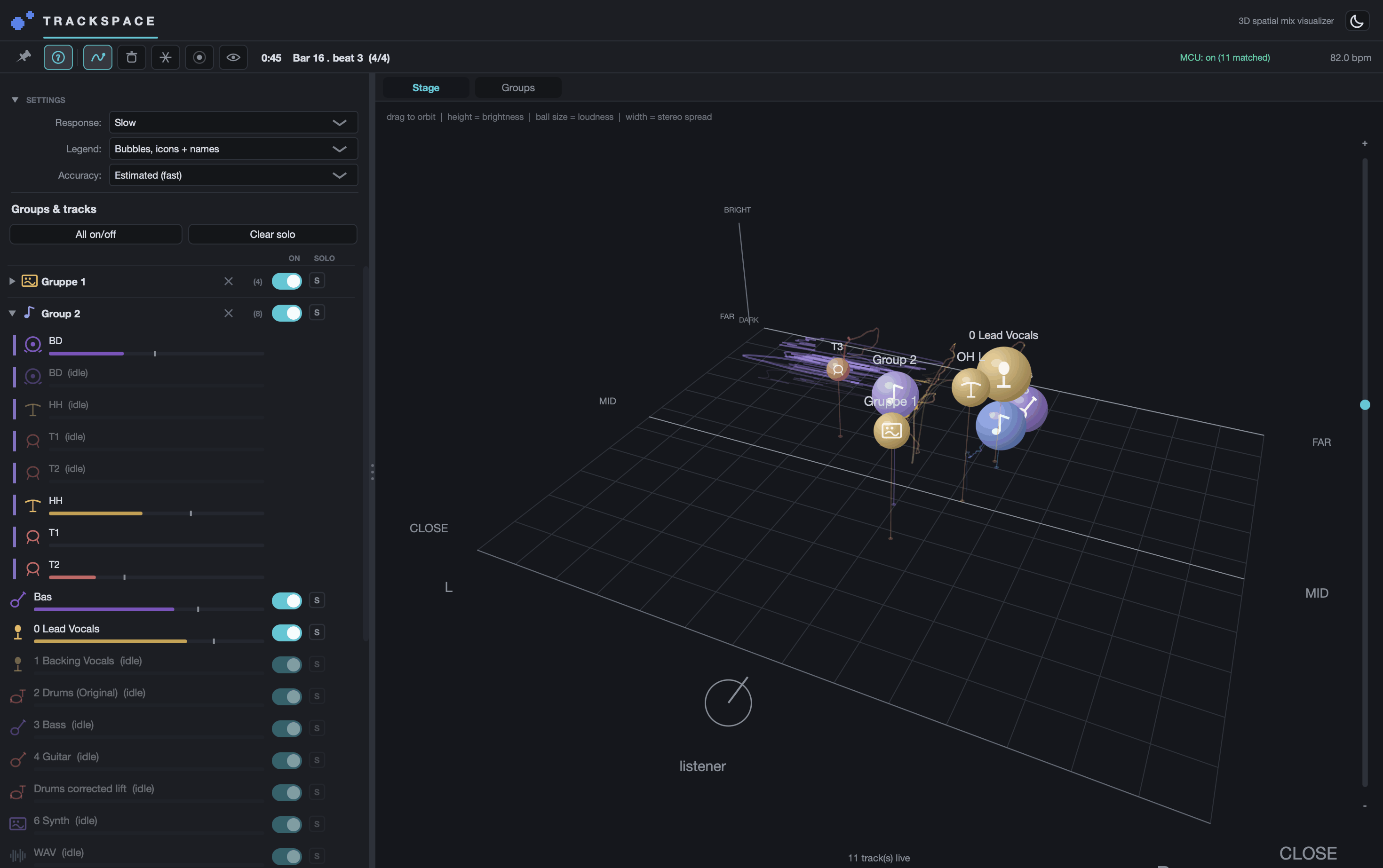
Your ears place every instrument in a room. TrackSpace draws that room.
A stereo file does not store where anything sits. Your brain works it out from a handful of clues in the sound itself — how loud a thing is, how bright, how much room you can hear around it. TrackSpace measures the same clues and puts the result on a stage.
It is a window into your mix, not a processor.
It listens to the result, not to your settings.
TrackSpace does not read your plugin parameters. A small pass-through plugin sits at the end of each channel and listens to what comes out, and the Hub draws the mix from that.
The practical difference: a reverb you left bypassed cannot fool it, because it is looking at the sound rather than at the knob. If a track sits closer than you expected, that is what the channel is actually producing.
What the stage is showing you.
| On the stage | What it means |
|---|---|
| Left and right | Where the track is pannedPan Where a sound sits between the left and right speakers, set by feeding it louder to one side than the other. More in the dictionary. |
| Near and far | How close the sound feels — dry and upfront, or back in the room. |
| Size | How loud it is. |
| Width | How wide the stereo imageStereo width How wide a sound spreads between the speakers — a single point for mono, a broad image for a decorrelated stereo source. More in the dictionary is; a mono source stays a point. |
| Height | How bright it is. This one is a drawing convention, not a physical height — brighter sounds are placed higher so you can tell them apart. |
You can freeze the whole picture on one instant, leave a trace behind each track to watch where it travels through the song, hide channels that are not playing, and solo anything on the stage.
One setup step, and it is worth doing
Logic Pro applies the pan knobPan Where a sound sits between the left and right speakers, set by feeding it louder to one side than the other. More in the dictionary after the insertsInsert effect An effect placed directly in a channel's path, so the whole signal passes through it — unlike a send, which feeds a copy. More in the dictionary, which means no plugin on the channel can hear it. So the Hub connects to Logic Pro the way a hardware control surfaceControl surface A hardware desk of faders and knobs that drives a DAW's mixer and receives its settings back, pan positions included. More in the dictionary does, and reads the real pan positions directly. That setup step is the difference between tracks that follow your pan knob exactly and tracks that all sit in the middle.
You don't hear channels — you hear instruments.
A mic'd kit is a kick, a snare, two overheads, a room mic and a bus. A layered vocal is a lead, a double, two harmonies and a reverb returnReturn The channel that brings a shared effect, fed by sends, back into the mix. More in the dictionary. You hear one drum kit and one voice; the stage shows you nine separate objects. Grouping collapses each set back into the single thing you actually hear — which is also the only way the reverb return counts towards where the voice sits.
The details.
- Type
- Pass-through probe + Hub app
- Probe format
- Audio UnitAudio Unit Apple's plug-in format for effects and instruments on the Mac — the format Logic Pro loads. More in the dictionary (AU) — insert last in the chain
- Host
- Logic Pro (macOS 11 or newer)
- Architecture
- Apple Silicon + Intel (Universal)
- Real pan
- Read live from Logic Pro, one-time setup
- Audio impact
- None — the signal passes through untouched
- Update cadence
- Probe readings reach the Hub every ~46 ms
- Status
- In development
Release status
TrackSpace is still in development. There is no build-it-yourself route and no buy button — it will be sold, with a signed installer, once it is finished, and not before.
Where that stands