Session map · Logic Pro projects
Read in your browser — the file never leaves your machineSee your Logic Pro session
as a signal-flow map.
Commercial mixes run to a few hundred tracks. SessionMap draws the session as a map you can read — busses, sends, and the path any channel takes to the stereo out — instead of clicking through channel strips one at a time.
Free · nothing to install · runs in your browser
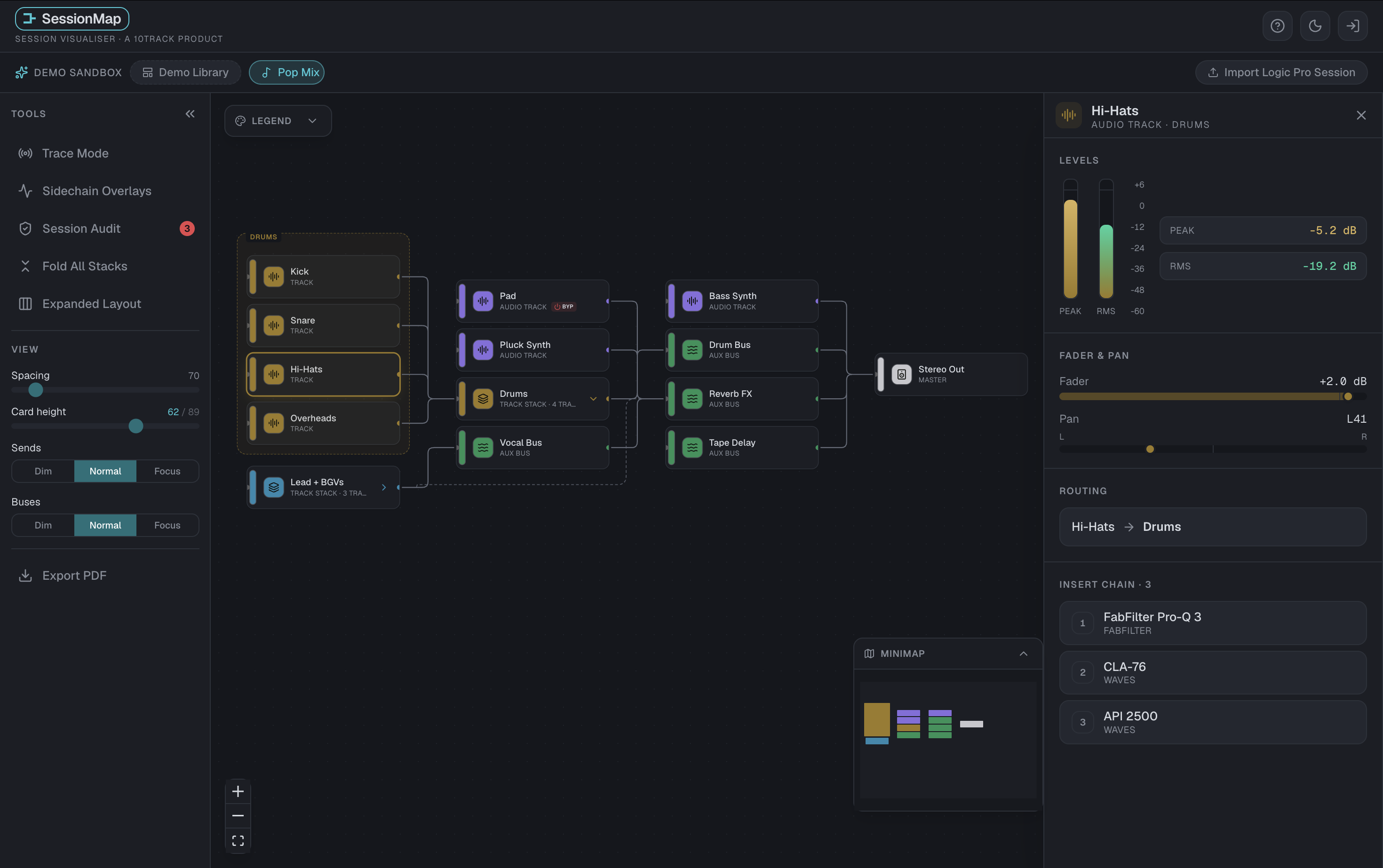
Half an hour before the mix even starts.
Every session that arrives from somebody else has their routing decisions buried in it, and Logic Pro shows you the channels rather than the wiring between them.
Busses that go nowhere
An auxAux channel A mixer channel with no recording of its own; it processes and levels what is routed to it, often a bus. More in the dictionary left over from three revisions ago. Nothing sounds wrong — that part of the mix just quietly is not there.
A session lands in your inbox
Before you touch a fader you spend half an hour learning somebody else's decisions. That half hour is the half hour this is built for.
Built for people who think in signal flow.
Designed around sessions that are actually complicated, rather than around a tidy demo.

It checks the session for you
BussesBus A shared signal path that several tracks feed, carrying them on together, usually to an aux. More in the dictionary with nothing arriving at them, sendsSend A copy of a channel's signal, at its own level, routed to a bus while the main output carries on. More in the dictionary pointing at a destination that is not there, and routing that dead-ends before it reaches the master. Read straight from your Logic Pro project, not from a summary of it.
Your session never leaves your computer
Nothing is uploaded. The file is read inside your browser and forgotten when you close the tab, so unreleased material stays where it is. You can watch the network panel and confirm it.
Export the map as a PDF
One click, for mix notes, recall sheets or handing a session over. It is a vector drawing, not a screenshot — sharp at any zoom, with the track names as real text you can select and search.
Straight from the project file.
Open the import window. SessionMap reads the project file itself — real track names, real output bussesBus A shared signal path that several tracks feed, carrying them on together, usually to an aux. More in the dictionary, real aux sendsSend A copy of a channel's signal, at its own level, routed to a bus while the main output carries on. More in the dictionary — on, switched off, or turned fully down, and the returnsReturn The channel that brings a shared effect, fed by sends, back into the mix. More in the dictionary they feed.
SessionMap is a free beta.
The full canvas at any session size, plus importing your own Logic Pro sessions and exporting the map — all of it at no cost.
Try it on an example session without signing in. To open your own Logic Pro project, create a free account.
There is no price yet because we would rather ask than guess.
“Beta” here means your routing comes in for real and some things around it are still rough. Your session file is read inside your browser and is never uploaded; if something is broken, the way to say so is an email.
Ready to map a session?
Open a Logic Pro project and see the routing as a map. Try it on an example session without signing in. To open your own Logic Pro project, create a free account.